
ChatGPT
Overview
ChatGPT is an AI assistant from OpenAI that helps people write, research topics, understand documents, analyze data, and work through coding problems using natural-language instructions. It’s useful for students, marketers, developers, researchers, and small-business owners who want help getting from a rough idea to a workable first draft, explanation, or solution.
What is ChatGPT used for?
ChatGPT is most useful when you have a task that requires explanation, drafting, analysis, or several rounds of refinement rather than a single keyword search. Its conversational interface lets you describe what you’re trying to accomplish, review the response, and request targeted changes without starting from scratch.
For content teams, it can help create article outlines, draft product descriptions, generate headline variations, and turn a rough brief into a structured content plan. An SEO specialist, for example, could supply a target keyword, audience, and search intent, then use the response as a starting point for a page outline. Keyword research, search-volume estimates, and competitive claims still need suitable data sources.
For students and professionals, it can explain difficult concepts in simpler language, summarize supplied material, and help prepare questions for further research. Web search can also help with finding current information, although source quality and the accuracy of the resulting summary need to be assessed.
Developers can use it to explain unfamiliar code, identify possible causes of an error, draft tests, and explore different implementation approaches. People working with spreadsheets and reports can use supported file uploads and data-analysis tools to inspect datasets, calculate results, and look for patterns.
Small-business owners may find it useful for drafting customer replies, brainstorming campaigns, organizing standard operating procedures, and preparing meeting notes. These are starting points, not substitutes for professional judgment or a review of sensitive information.
You can start with the free version, ask follow-up questions to refine an answer, and use additional tools depending on your plan and account access. However, its responses aren’t always correct, so important facts, calculations, and citations should be checked before you rely on them.
Who should use ChatGPT, and who should skip it?
Best for
- Content writers, editors, and SEO specialists who need drafts and outlines.
- Students and lifelong learners who want explanations and study support.
- Developers who need help understanding code or debugging.
- Small-business owners who want to prepare customer communications and working documents.
- Analysts who need help exploring supported files and datasets.
Who should skip it or use it cautiously?
- People who need every answer to be correct without verification.
- Users who require a completely offline, locally hosted assistant.
- Organizations that cannot approve the product’s data-handling arrangements.
- Occasional users who don’t need features beyond the free plan.
- Developers who need API access but expect a ChatGPT subscription to cover API charges.
ChatGPT is a practical starting point for people who need one assistant for writing, research, coding, and everyday problem-solving. Its free plan makes it easy to evaluate before paying, but factual errors, usage limits, and privacy considerations remain important. For most prospective users, the sensible approach is to try it on real tasks first and upgrade only when the additional access delivers clear value.
Key Features
- Conversational assistance
- Web search and source discovery
- File uploads and data analysis
- Voice conversations
- Image generation
- Custom GPTs and reusable workflows
- Coding assistance and API integration
Pros & Cons
What We Like
- Easy to get started: You can describe a task in everyday language without learning a complicated interface first.
- Useful across different jobs: One tool can assist with drafting, coding, explanations, brainstorming and supported data-analysis tasks.
- Good for iterative editing: Follow-up prompts make it practical to refine a draft, adjust its tone or request a different format.
- Free access is available: Users can try the core product before committing to a monthly subscription.
- Multiple ways to work: Supported text, voice, file and image features can accommodate different tasks and working styles.
Things to Consider
- Answers can be incorrect: It can produce plausible-sounding errors, misunderstand a question or provide claims that need independent verification.
- Usage limits interrupt some workflows: Free and paid accounts can encounter model-specific or tool-specific limits.
- Long conversations can lose focus: Reviewers report problems with context, repeated answers and handling extensive material.
- Privacy requires attention: Personal-account data settings, uploaded files and connected services deserve careful review before sensitive information is shared.
- Subscription value depends on your workload: Paying for more access may not be worthwhile for someone who only asks occasional questions.
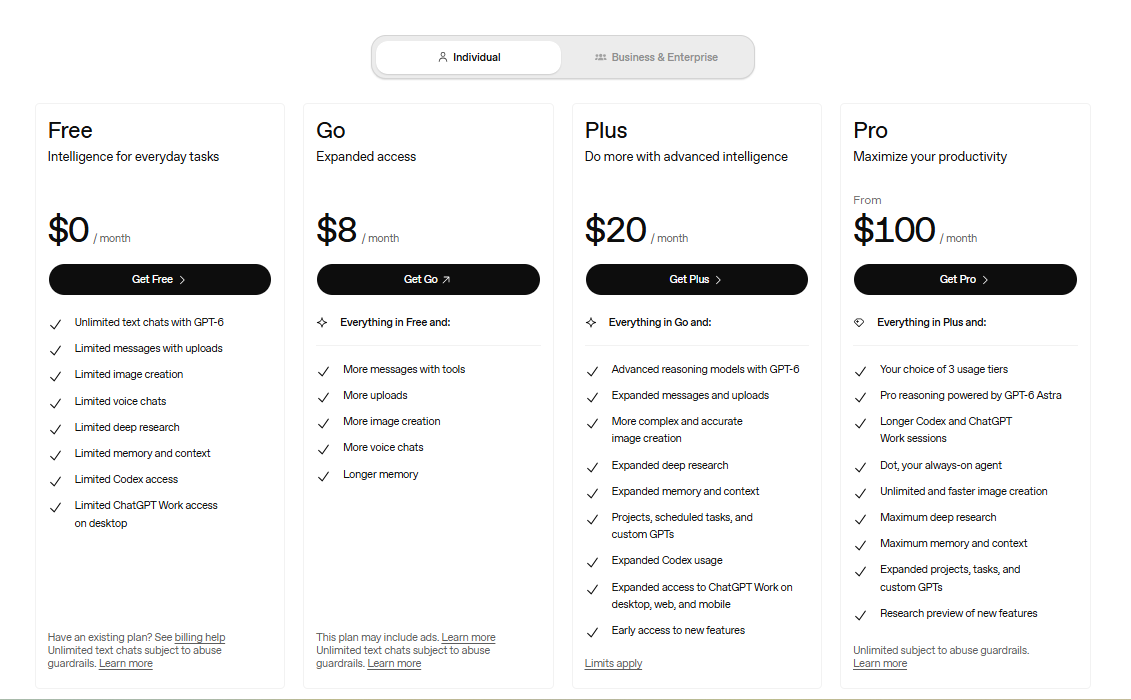
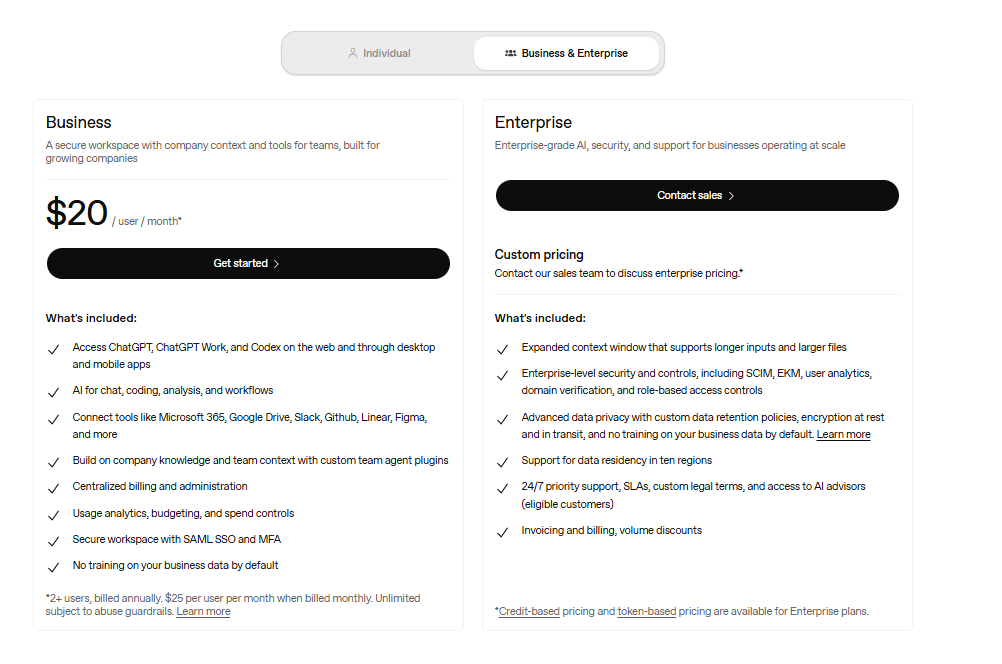
Pricing